Introduction

Welcome to the midas_civil and midas_gen documentation.
Python libraries provide a powerful and flexible interface for automating structural analysis workflows in MIDAS CIVIL NX and MIDAS GEN NX. Designed for engineers and developers, these libraries enable seamless interaction with modeling, loading, analysis, and results extraction features through Python scripts. By integrating automation into everyday engineering tasks, users can improve efficiency, reduce manual effort, and build customized solutions tailored to complex project requirements.
Installation
Make sure you have Python 3 installed.
Install the MIDAS Python interface via Pip command.
pip install midas-civil # FOR CIVIL NX
pip install midas-gen # FOR GEN NX
If already installed, upgrade the package to latest version.
pip install midas-civil --upgrade # FOR CIVIL NX
pip install midas-gen --upgrade # FOR GEN NX
Additional libraries required by the modules are
- Numpy
- Polars
- Openpyxl
- Requests
- SciPy
- Gmsh
- Pillow
- Pandas
- Colorama
- Tqdm
To import the package use the import *
from midas_civil import *   # FOR CIVIL NX
from midas_gen import *   # FOR GEN NX
NOTE
The codes/steps shown uses midas_civil but same code can be used with midas_gen.
Video Guide
Functions available
MAPI_KEY
Handles and stores the MIDAS API key used for authenticating requests.
#Importing the midas-civil package
from midas_civil import *

#Sets the MAPI Key for Python interface
MAPI_KEY('eyJ1ciI6InN1bWl0QG1pZGFzaXQuY29tIiwicGciO.252a81571d')
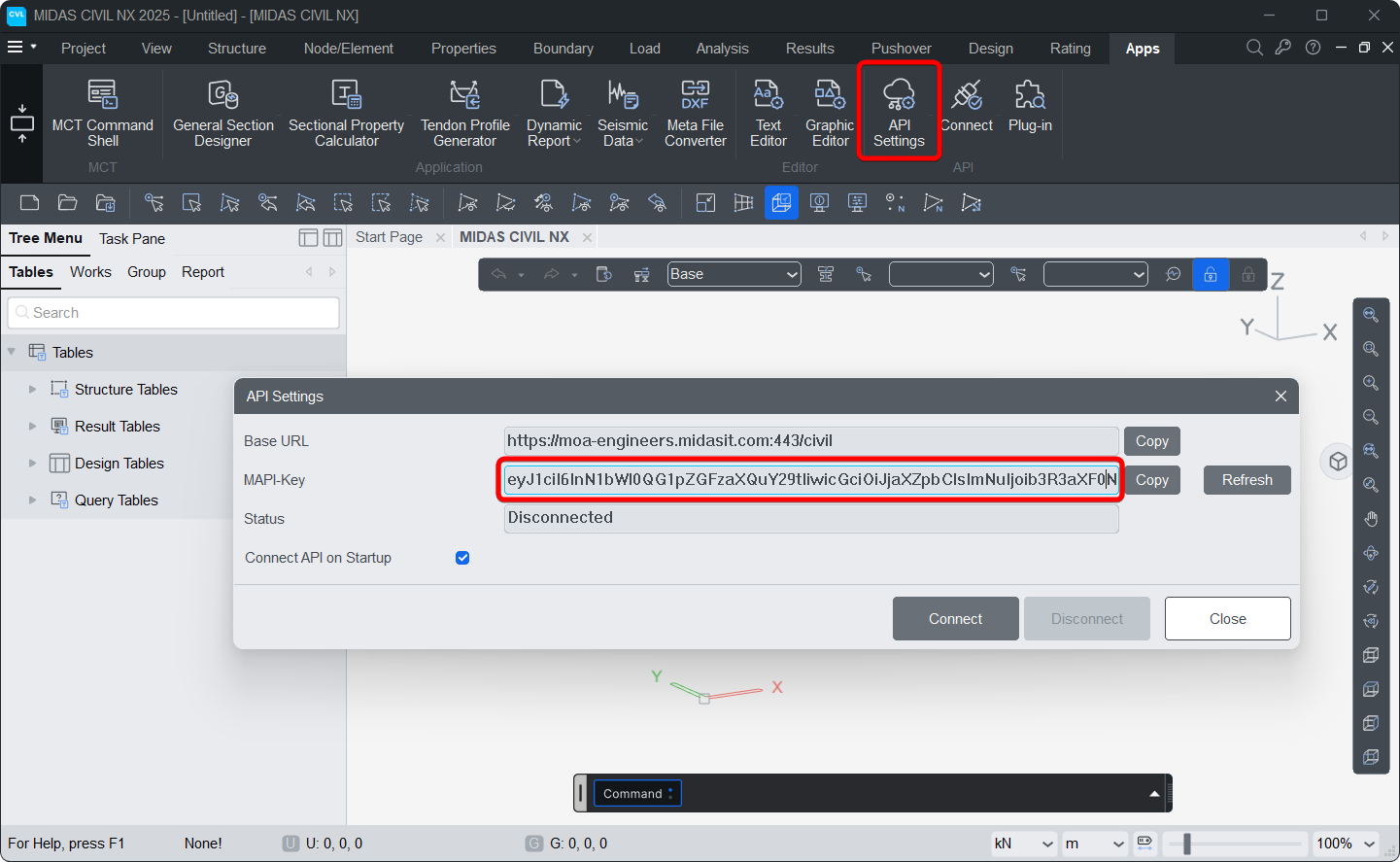
NOTE :
- Ensure your MIDAS Civil NX application is open and connected.
- The MAPI key used in your Python script must match the key in the Civil NX application.
MAPI_BASEURL
Handles and stores the MIDAS API Base URL used for sending requests.
#Importing the midas-civil package
from midas_civil import *

#Sets the Base URL for Python interface
MAPI_BASEURL('https://moa-engineers.midasit.com:443/civil')
MAPI_BASEURL.autoURL
When using python library in a web environment, .com moa-engineers.midasit.com server may be different for the MIDAS CIVIL NX and the system on which python is running.
In such scenario, python may fail to connect with https://moa-engineers.midasit.com:443/civil Base URL.
The .com URL automatically connects to the nearest API server based on the system’s network location.
There are total 5 MIDAS API servers located across the globe :
| No. | Region | Base URL |
|---|---|---|
| 1. | South Korea | moa-engineers-kr.midasit.com |
| 2. | India | moa-engineers-in.midasit.com |
| 3. | Europe | moa-engineers-gb.midasit.com |
| 4. | USA | moa-engineers-us.midasit.com |
| 5. | China | moa-engineers.midasit.cn |
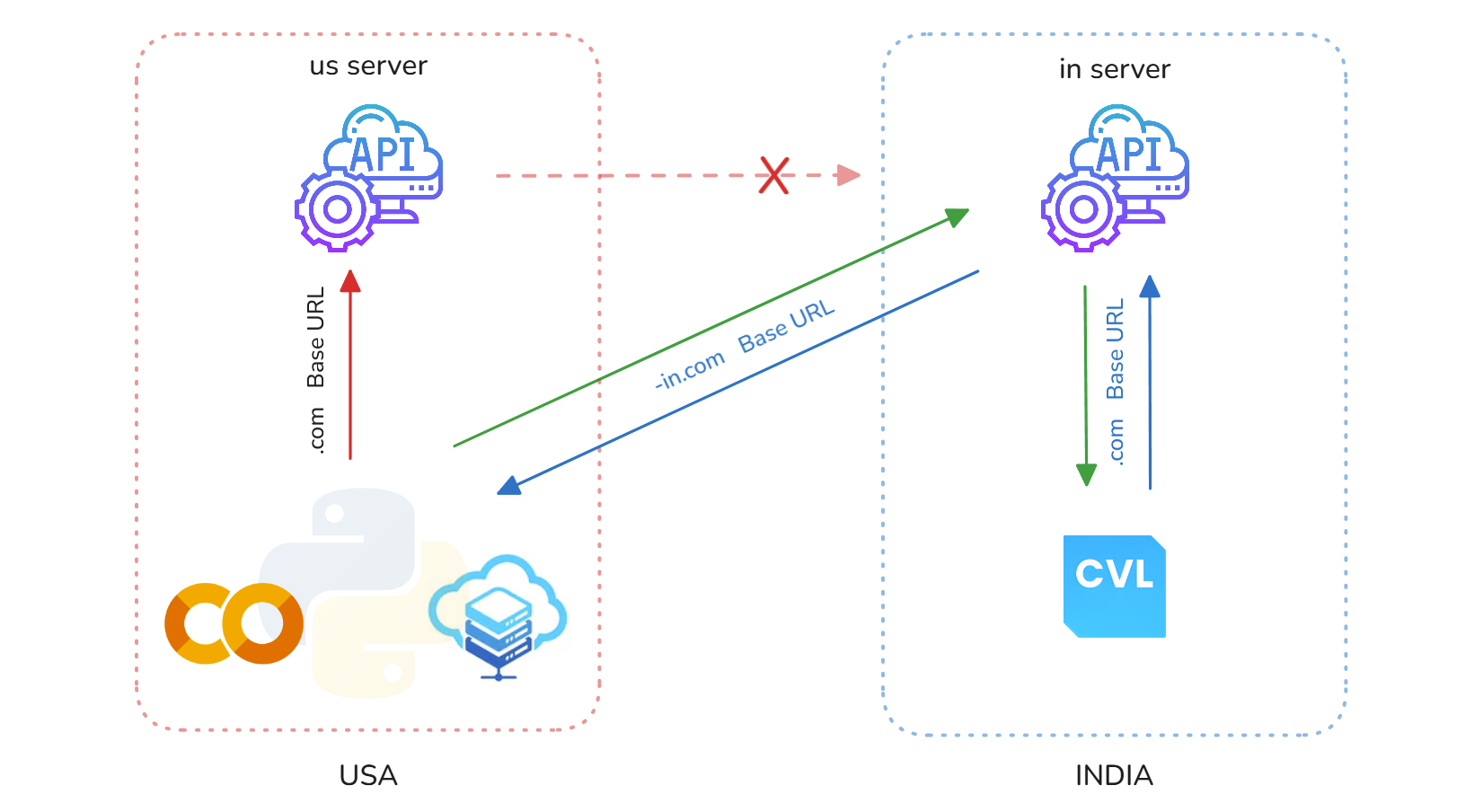
For example, a user in India may have MIDAS CIVIL NX connected to the India server, but run a Python script in Google Colab, which is hosted on a US server.
Because the servers are different, Python library may not connect correctly.
In this situation, we can use the MAPI_BASEURL.autoURL() function.
This function automatically finds and sets the correct Base URL based on the provided MAPI Key, ensuring a successful connection.
from midas_civil import *

# Sets the MAPI Key for autoURL to connect
MAPI_KEY('xxxxxxxxxxxxxxxxxx')

# Automatically set the Base URL for Python interface
MAPI_BASEURL.autoURL()
MAPI_COUNTRY
The MAPI_COUNTRYfunction allows users to define the country of CIVIL NX version, which in turn automatically retrieves and sets the appropriate MAPI Key and Base URL from the system registry.
#Importing the midas-civil package
from midas_civil import *


MAPI_COUNTRY('CH') # For Chinese version
MAPI_COUNTRY('KR') # For Korean version
MAPI_COUNTRY('US') # For US / English version
NOTE :
- If retriving Base URL and MAPI-Key from registry fails, then :
a. Define Base URL using MAPI_BASEURL( )
b. Define MAPI Key using MAPI_KEY( )
MidasAPI
Send requests to MIDAS Civil NX.
Parameters :
method (str): HTTP method ("GET", "POST", "PUT", "DELETE")command (str): API endpoint (e.g., "/db/NODE")body (dict): Request payload (JSON format). Optional for "GET" and "DELETE"
Returns :
- A dict representing the JSON response from the API.
Example :
from midas_civil import*

MAPI_KEY("eyJ1ciI6IklOMjQwN0ZZVDIiLCJw") #Paste your Mapi Key

# Create a node
MidasAPI("PUT","/db/NODE",{"Assign": {"1": {"X": -1,"Y": -1,"Z": -1}}})
getID
Return ID of objects(Node,Element,Section,Material)
Parameters :
-
*objects (list): Objects or List of Objects of type Node, Element, Section and Material⭐ Supports nested list
Returns :
- An array with ID of inputted objects
Example :
from midas_civil import *
MAPI_KEY('eyJ1ciI6InN1bWl0QG1pZGFzaXQuY29tIiwicGciO252a81571d')

Node(0,0,0,id=1)    # Create Node at 0,0,0 with ID = 1
Node(1,1,1,id=2)    # Create Node at 1,1,1 with ID = 2
Node(2,2,2,id=3)    # Create Node at 2,2,2 with ID = 3

beam_1 = Element.Beam(1,2)  # Create Beam connecting Node 1 and Node 2 (default ID = 1)
beam_2 = Element.Beam(2,3)  # Create Beam connecting Node 2 and Node 3 (default ID = 2)


print(getID(beam_1))
print(getID(beam_2))
print(getID(beam_1,beam_2))

#   Output :
#   [1]
#   [2]
#   [1, 2]
getNodeID
Return Node ID of Element objects
Parameters :
-
*objects (list): Objects or List of Objects of type Element(Beam, Truss...)⭐ Supports nested list
Returns :
- An array with Node IDs of inputted objects
Example :
from midas_civil import *
MAPI_KEY('eyJ1ciI6InN1bWl0QG1pZGFzaXQuY29tIiwicGciO252a81571d')

Node(0,0,0,id=1)    # Create Node at 0,0,0 with ID = 1
Node(1,1,1,id=2)    # Create Node at 1,1,1 with ID = 2
Node(2,2,2,id=3)    # Create Node at 2,2,2 with ID = 3

beam_1 = Element.Beam(1,2)  # Create Beam connecting Node 1 and Node 2 (default ID = 1)
beam_2 = Element.Beam(2,3)  # Create Beam connecting Node 2 and Node 3 (default ID = 2)


print(getNodeID(beam_1))
print(getNodeID(beam_2))
print(getNodeID(beam_1,beam_2))

#   Output :
#   [[1, 2]]
#   [[2, 3]]
#   [[1, 2], [2, 3]]