2D Elements
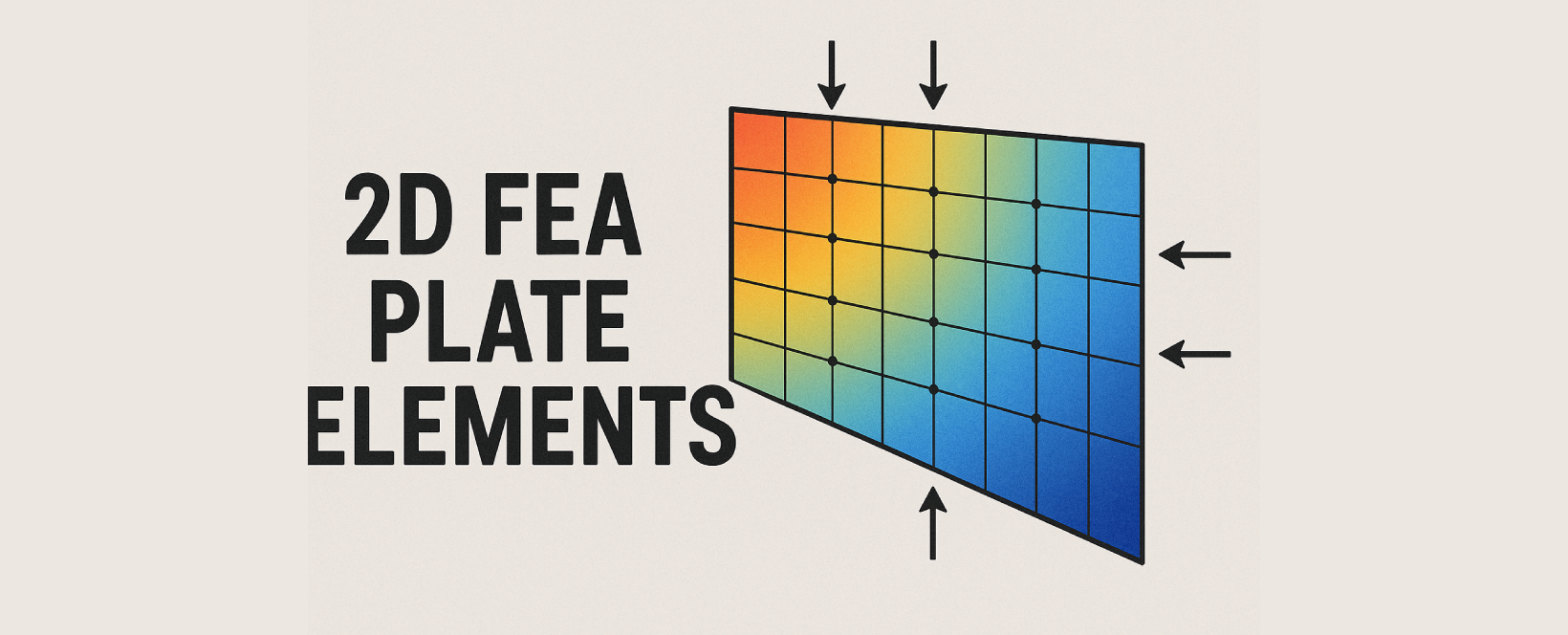
PLATE
A nested class within Element used to create Plate elements.
Object Attributes
ID: Element ID
TYPE: Element type = 'PLATE'
MATL: Material ID of the plate element
SECT: Section/Thickness ID of the plate element
NODE: Nodes of element in list. eg: [1,2,3,4]
ANGLE: Beta angle of the plate element
AREA : Area of Plate element
NORMAL : Normal vector of the Plate element eg: (0,0,1)
CENTER : Centroid location of the Plate element (x,y,z)
STYPE: Type of Plate element
1 : Thick |
2 : Thin |
3 : Thick w Drilling dof |
4 : Thin w Drilling dof
To create Plate element we have total 2 methods :
1. Plate
Element.Plate(nodes:list, stype:int=1, mat = 1, sect = 1, angle = 0, group = '' , id=None)
Creates a Plate element.
Parameters
node: Nodes of the Plate elementstype (default=3): Sub Type of Plate element
1 : Thick | 2 : Thin | 3 : Thick w Drilling dof | 4 : Thin w Drilling dofmat (default=1): Material ID of the Plate elementsect (default=1): Thickness ID of the Plate elementangle (default=0): Beta angle of the Plate elementgroup (default=''): Structure group of the element and its nodes(can be str or list eg. 'SG' or ['SG1','SG2'])id (default=None): Manually assign an ID. If None, ID will be auto-assigned.
Examples
Node(0,0,0)
Node(1,0,0)
Node(1,1,0)
Node(0,1,0)
Element.Plate([1,2,3,4])

Node.create()
Element.create()
2. Plate.loftGroups
Element.Plate.loftGroups(strGroups:list, stype:int=1, mat = 1, sect = 1, angle = 0, group = '' , id=None , nDiv:int=1 , bClose:bool=False)
Creates Plate elements connecting the nodes in Structure groups.

Parameters
loftGroups: List of Structure groups whose nodes are to be used(eg. ['SG1','SG2','SG3']) .
Min. 2 groups with 2 nodes are nodes are required.stype (default=3): Sub Type of Plate element
1 : Thick | 2 : Thin | 3 : Thick w Drilling dof | 4 : Thin w Drilling dofmat (default=1): Material ID of the Plate elementsect (default=1): Thickness ID of the Plate elementangle (default=0): Beta angle of the Plate elementgroup (default=''): Structure group of the element and its nodes(can be str or list eg. 'SG' or ['SG1','SG2'])id (default=None): Manually assign an ID. If None, ID will be auto-assigned.nDiv (default = 1): Number of divisions between each loft.bClose (default=False): Whether to close the loop or not.
Examples
Element.Beam.SDL([0,0,0],[1,0,0],10,10,group='SG1')
Element.Beam.SDL([0,1,0],[1,0,0],10,10,group='SG2')
Element.Beam.SDL([0,3,0],[1,0,0],10,10,group='SG3')

Element.Plate.loftGroups(['SG1','SG2','SG3'])

Node.create()
Element.create()
3. Plate.fromPoints
Element.Plate.fromPoints(points: list, meshSize=1.0 , meshType='Tri', innerPoints=None , stype = 1, mat = 1, sect = 1, angle = 0, group = "" , id = None )
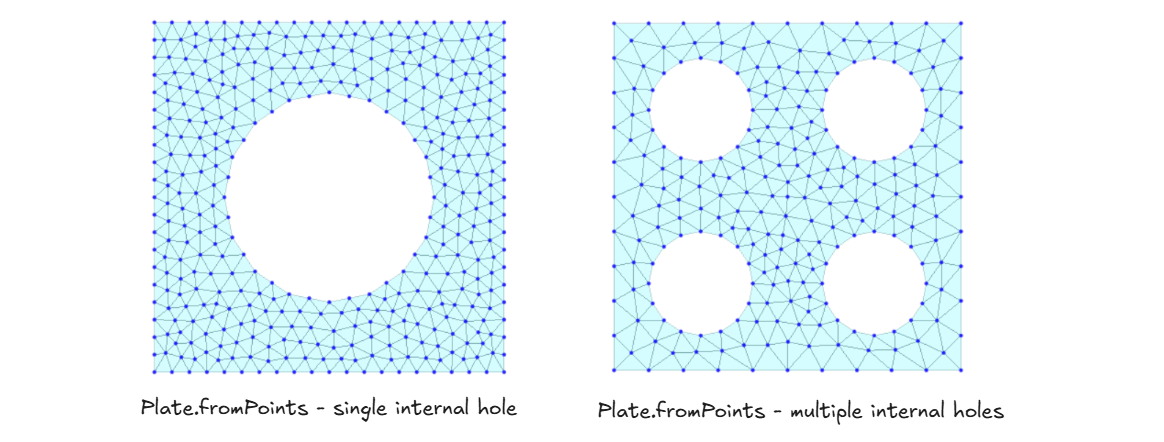
Creates meshed Plate elements connecting the boundary points.
Parameters
points: List of points representing outer boundary(eg.[(x1,y1,z1) , (x2,y2,z2), (x3,y3,z3)]) .meshSize: Mesh size .meshType: Type of meshing (TriorQuad).
Gmsh is being used for meshing. So, depending uponpointsandinnerPointsinput , Quad mesh-size can differ or Quad meshing can even fail.innerPoints (optional): List of points representing internal holes can be single or multiple holes.
Single hole -[(x1,y1,z1) , (x2,y2,z2), (x3,y3,z3)]
Multiple hole -[[(x11,y11,z11) , (x12,y12,z12), (x13,y13,z13)],[(x21,y21,z21) , (x22,y22,z22), (x23,y23,z23)]]stype (default=3): Sub Type of Plate element
1 : Thick | 2 : Thin | 3 : Thick w Drilling dof | 4 : Thin w Drilling dofmat (default=1): Material ID of the Plate elementsect (default=1): Thickness ID of the Plate elementangle (default=0): Beta angle of the Plate elementgroup (default=''): Structure group of the element and its nodes(can be str or list eg. 'SG' or ['SG1','SG2'])id (default=None): Manually assign an ID. If None, ID will be auto-assigned.
Examples
# PLATE MESHING WITH SINGLE HOLE

from midas_civil import *
import math

# Creates circle with given radius and center
def CirclePts(origin,radius,nSides):
    pts = []
    for i in range(nSides):
        theta = i*2*math.pi/nSides
        pts.append([origin[0]+radius*math.sin(theta),origin[1]+radius*math.cos(theta),origin[2]])
    return pts

innerHole=CirclePts((0,0,0),6,16)
outerBoundary = [(-10,-10,0),(10,-10,0),(10,10,0),(-10,10,0)]

Element.Plate.fromPoints(outerBoundary,1,'Tri',innerPoints=innerHole,sect=2,group='Pile Cap')

Node.create()
Element.create()
# PLATE MESHING WITH MULTIPLE HOLES
from midas_civil import *
import math

# Creates circles with given radius and center
def CirclePts(origin,radius,nSides):
    pts = []
    for i in range(nSides):
        theta = i*2*math.pi/nSides
        pts.append([origin[0]+radius*math.sin(theta),origin[1]+radius*math.cos(theta),origin[2]])
    return pts

innerHole=[CirclePts((-5,-5,0),3,16),CirclePts((-5,5,0),3,16),CirclePts((5,-5,0),3,16),CirclePts((5,5,0),3,16)]
outerBoundary = [(-10,-10,0),(10,-10,0),(10,10,0),(-10,10,0)]

Element.Plate.fromPoints(outerBoundary,2,'Tri',innerPoints=innerHole,sect=2,group='Pile Cap')

Node.create()
Element.create()
4. Plate.extrude
Element.Plate.extrude(points: list , dir:list , nDiv:int=1 , bClose:bool=False , inpType='XYZ' , stype = 1, mat = 1, sect = 1, angle = 0, group = "" , id = None)
Creates meshed Plate elements connecting the boundary points.
Parameters
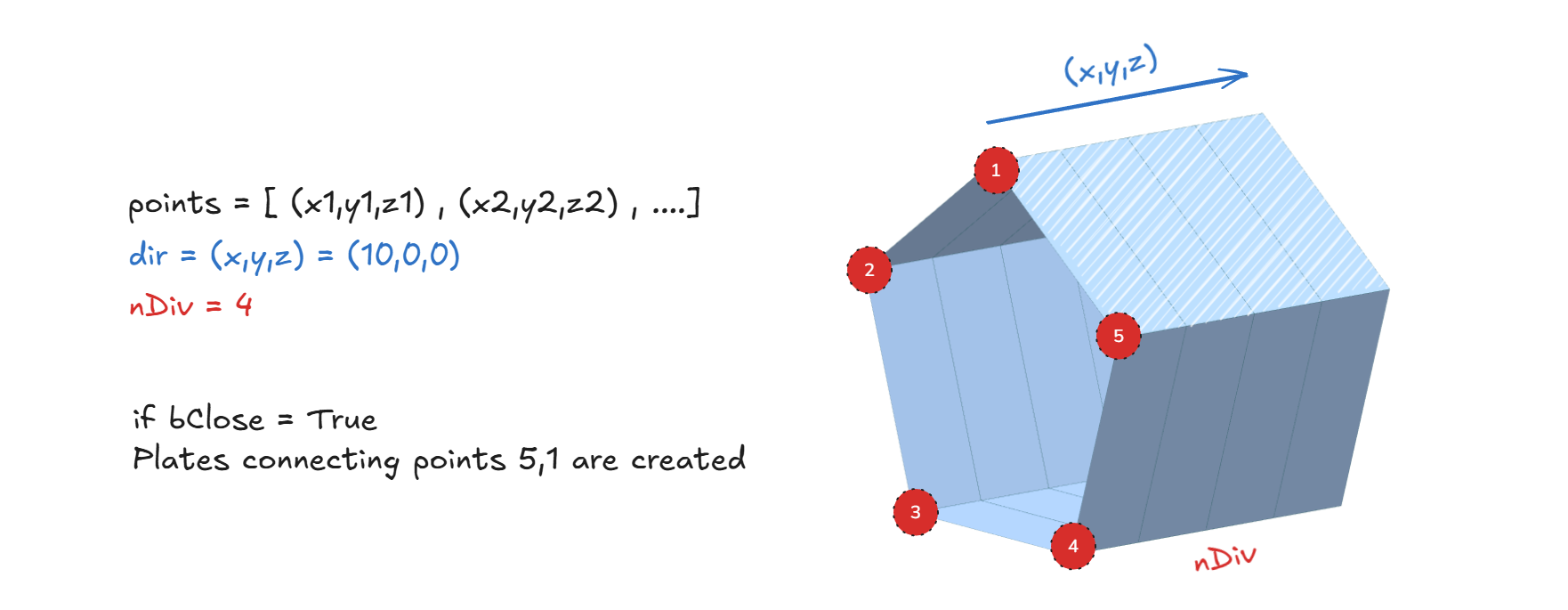
points: List of points to be connected and extruded. Input depends upon theinpType.dir: Direction and length of extrusion (eg.(0,0,2)- extrude along z direction by 2 units)nDiv: No. of divisions along the extrusion.bClose: Whether to close the loop or not.-
inpType: Type ofpointsinput (eg.XYZorIDorNODE)
1 :XYZ- points (list(x,y,z)) =[(x1,y1,z1) , (x2,y2,z2), (x3,y3,z3)]
2 :ID- points (list(int)) =[nID_1 , nID_2 , nID_3]
3 :NODE- points (list(Node)) =[Node1 , Node2 , Node3] -
stype (default=3): Sub Type of Plate element
1 : Thick | 2 : Thin | 3 : Thick w Drilling dof | 4 : Thin w Drilling dof mat (default=1): Material ID of the Plate elementsect (default=1): Thickness ID of the Plate elementangle (default=0): Beta angle of the Plate elementgroup (default=''): Structure group of the element and its nodes(can be str or list eg. 'SG' or ['SG1','SG2'])id (default=None): Manually assign an ID. If None, ID will be auto-assigned.
Examples
from midas_civil import *
import math

def CirclePts(origin,radius,nSides):
    pts = []
    for i in range(nSides):
        theta = i*2*math.pi/nSides
        pts.append([origin[0],origin[1]+radius*math.sin(theta),origin[2]+radius*math.cos(theta)])
    return pts

Element.Plate.extrude(CirclePts((0,0,0),6,5),(10,0,0),4,True,inpType='XYZ')

Node.create()
Element.create()
5. Plate.extrudeLine
Element.Plate.extrudeLine(elmIDs: list, dir: list, nDiv: int = 1, bDeleteLine: bool = False, stype = 1, mat = 1, sect = 1, angle = 0, group = "", id = None)
Creates meshed Plate elements by extruding existing 1D line elements.

Parameters
elmIDs: List of 1D line element IDs to be extruded (list(int)).dir: Direction and length of extrusion (eg.(0,0,2)- extrude along z direction by 2 units)nDiv: No. of divisions along the extrusion.bDeleteLine: Whether to delete the original source line elements after extrusion.stype (default=1): Sub Type of Plate element
1 : Thick | 2 : Thin | 3 : Thick w Drilling dof | 4 : Thin w Drilling dofmat (default=1): Material ID of the Plate elementsect (default=1): Thickness ID of the Plate elementangle (default=0): Beta angle of the Plate elementgroup (default=''): Structure group of the element and its nodes(can be str or list eg. 'SG' or ['SG1','SG2'])id (default=None): Manually assign an ID. If None, ID will be auto-assigned.
Examples
from midas_civil import *
import math

Element.Beam.SE((0,0,0),(0,5,0),10,group='#T_Sec')
Element.Beam.SE((0,2.5,0),(0,2.5,-2),4,group='#T_Sec')


Element.Plate.extrudeLine(elmIDs=elemsInGroup('#T_Sec'),
                          dir=(10,0,0),
                          nDiv=20,
                          bDeleteLine=True)

Model.create()
Examples
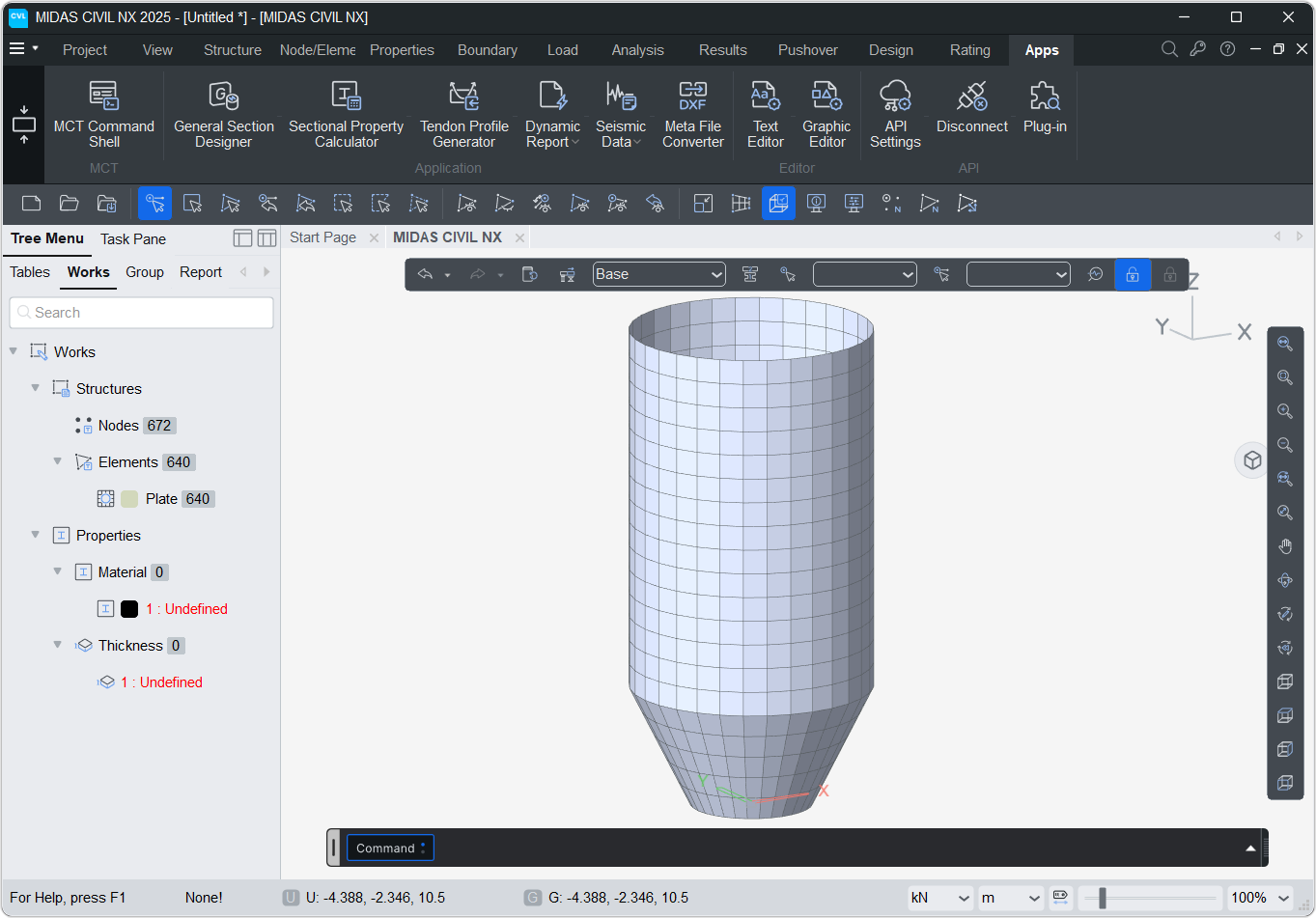
1. Silo
import math
R_top=5.0   # Radius at the top of Silo
R_bot = 2.5 # Radius at the bottom of Silo < R_top

H_tot=20.0 # Total height of Silo
H_tap = 5  # Height of tapered portion < H_tot

nR=32      # Sides of cylinder
nH=20      # Divisions along height

for q in range(nH+1):
    for i in range(nR):
        theta = i*2*math.pi/nR
        R = min(R_top,R_bot+q*H_tot/nH*(R_top-R_bot)/(H_tap))
        Node(R*math.sin(theta),R*math.cos(theta),q*H_tot/nH)

for q in range(nH):
    n_list = list(range(q*nR+1,(q+1)*nR+1))
    for i in range(nR):
        n1=n_list[i]
        n2=n_list[(i+1)%nR]
        Element.Plate([n1,n2,n2+nR,n1+nR])

Node.create()
Element.create()
WALL
A nested class within Element used to create Wall elements. (Only applicable in GEN NX)
Wall
Element.Wall(nodes: list, stype: int, wtype:int , wID:int , mat , sect , group = "" , id: int = None)
Creates a Wall element.
Parameters
node: Nodes of the v element-
stype (default=2): Sub Type of Wall element
1 : Membrane | 2 : Plate -
wtype (default=2): Wall type
0 : Plate Base | 1 : CRB-Pin | 2 : CRB-Fixed -
wID (default=1): Wall ID of the Wall element mat (default=1): Material ID of the Wall elementsect (default=1): Thickness ID of the Wall elementangle (default=0): Beta angle of the Wall elementgroup (default=''): Structure group of the element and its nodes(can be str or list eg. 'SG' or ['SG1','SG2'])id (default=None): Manually assign an ID. If None, ID will be auto-assigned.
Object Attributes
ID: Element ID
TYPE: Element type = 'WALL'
MATL: Material ID of the Wall element
SECT: Section/Thickness ID of the Wall element
NODE: Nodes of element in list. eg: [1,2,3,4]
ANGLE: Beta angle of the Wall element
AREA : Area of Wall element
NORMAL : Normal vector of the Wall element eg: (0,0,1)
CENTER : Centroid location of the Wall element (x,y,z)
STYPE: Sub-Type of Wall element
1 : Membrane |
2 : Plate
WTYPE: Wall type
0 : Plate Base |
1 : CRB-Pin |
2 : CRB-Fixed
WID: Wall ID of the Wall element
Examples
Node(0,0,0)
Node(1,0,0)
Node(1,1,0)
Node(0,1,0)
Element.Wall([1,2,3,4])

Node.create()
Element.create()