Node
Represents a 3D point in space with ID. It facilitates node creation, synchronization, and deletion.
Note.
All the codes below assumes the initial import and MAPI Key definition.
from midas_civil import *
MAPI_KEY('eyJ1ciI6InN1bWl0QG1pZGFzaXQuY29tIiwicGciO252a81571d')
Node
Node(x , y , z , id=None , group = '' , merge = 1)
Parameters
x, y, z: Coordinates of the node.id (default=None): Manually assign an ID. If None, ID will be auto-assigned.group (default=''): Structure group of the node (can be str or list eg. 'SG' or ['SG1','SG2'])merge (default=1): If enabled, checks for existing nodes and return their IDs. No additional/duplicate node will be created.
Node.SE
Node.SE(s_loc: list, e_loc: list, n: int = 1, id=None , group = '' , merge = 1)
Parameters
s_loc: Start location. [x,y,z]e_loc: End location. [x,y,z]n (default=1): Number of division. n+1 nodes are created.id (default=None): Manually assign an ID. If None, ID will be auto-assigned.group (default=''): Structure group of the node (can be str or list eg. 'SG' or ['SG1','SG2'])merge (default=1): If enabled, checks for existing nodes and return their IDs. No additional/duplicate node will be created.
Node.SDL
Node.SDL(s_loc: list, dir: list, l: float, n: int = 1, id=None , group = '' , merge = 1)
Parameters
s_loc: Start location. [x,y,z]dir: Direction vector [dx, dy, dz]l: Total length of created nodes (seeElement.Beam.SDL).n (default=1): Number of division. n+1 nodes are created.id (default=None): Manually assign an ID. If None, ID will be auto-assigned.group (default=''): Structure group of the node (can be str or list eg. 'SG' or ['SG1','SG2'])merge (default=1): If enabled, checks for existing nodes and return their IDs. No additional/duplicate node will be created.
Node.fromList
Node.fromList(nodesList: list, id=None , group = '' , merge = 1)
Parameters
nodesList: List of[x, y, z]coordinates. e.g.[[0,0,0], [1,0,0], [2,0,0]].id (default=None): Manually assign an ID. If None, ID will be auto-assigned.group (default=''): Structure group of the node (can be str or list eg. 'SG' or ['SG1','SG2'])merge (default=1): If enabled, checks for existing nodes and return their IDs. No additional/duplicate node will be created.
Object Attributes
X, Y, Z: Coordinates of the node.
ID: Unique identifier.
LOC: (x,y,z) Coordinates of the node in tuple.
AXIS: Local direction of the node eg. [(1,0,0),(0,1,0),(0,0,1)] represent local X,Y,Z respectively. Created by bLocalAxis option of Beam element.
Retrieve Node by ID
nodeByID(id:int) : Returns NODE object with given ID.
Class Attributes
Node.nodes -> List of all nodes.
n1 = Node(0,1,2,10)    # Create Node at 0,1,2 with ID = 10
n2 = Node(0,3,4,20)    # Create Node at 0,3,4 with ID = 20

for n in Node.nodes:
    print(f' NODE ID = {n.ID} | X = {n.X} , Y = {n.Y} , Z = {n.Z}')

# Output :
# NODE ID = 10 | X = 0 , Y = 1 , Z = 2
# NODE ID = 20 | X = 0 , Y = 3 , Z = 4
Methods
Node.json
Returns a JSON representation of all Nodes defined in python.
n1 = Node(0,1,2,10)    # Create Node at 0,1,2 with ID = 10
n2 = Node(0,3,4,20)    # Create Node at 0,3,4 with ID = 20

print(Node.json())

# Output :
# {'Assign': {10: {'X': 0, 'Y': 1, 'Z': 2}, 20: {'X': 0, 'Y': 3, 'Z': 4}}}
Node.create
Sends the current node list to the Civil NX using a PUT request.
New nodes are created and existing nodes(same ID) in Civil NX will be updated.
n1 = Node(0,1,2,10)    # Create Node at 0,1,2 with ID = 10
n2 = Node(0,3,4,20)    # Create Node at 0,3,4 with ID = 20

Node.create()
Node.get
Fetches nodes from the Civil NX and return the JSON representation.
-Here, Civil model had 2 nodes
print(Node.get())
# Output
# {'NODE': {'1': {'X': 1, 'Y': 2, 'Z': 3}, '2': {'X': 1, 'Y': 3, 'Z': 2}}}
Node.sync
Retrieves Node data from the Civil NX and rebuilds the internal node list.
-Here, Civil model had 2 nodes
Node.sync()
for n in Node.nodes:
    print(f' NODE ID = {n.ID} | X = {n.X} , Y = {n.Y} , Z = {n.Z}')

# Output
# NODE ID = 1 | X = 1 , Y = 2 , Z = 3
# NODE ID = 2 | X = 1 , Y = 3 , Z = 2
Node.clear
Deletes all node data from Python.
Node.clear()
Node.delete
Deletes all node data from both Python and Civil NX.
Node.delete()
Examples
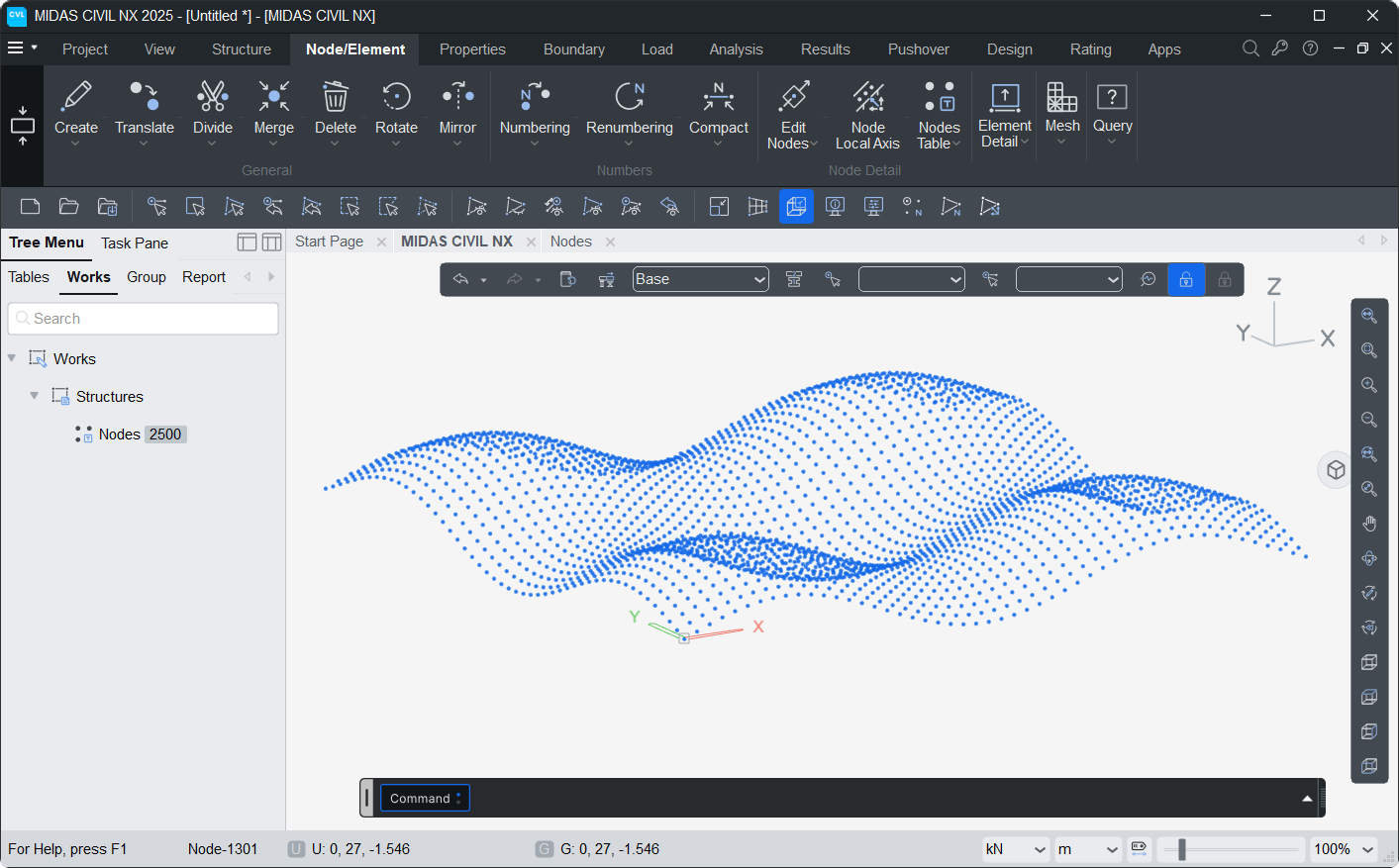
1. Sine Grid
import math
n=50
for j in range(n):
    for i in range(n):
        Node(i,j,2*(math.sin(i/5)+math.sin(j/5)),100*i+j+1)

Node.create()
2. Sphere Nodes
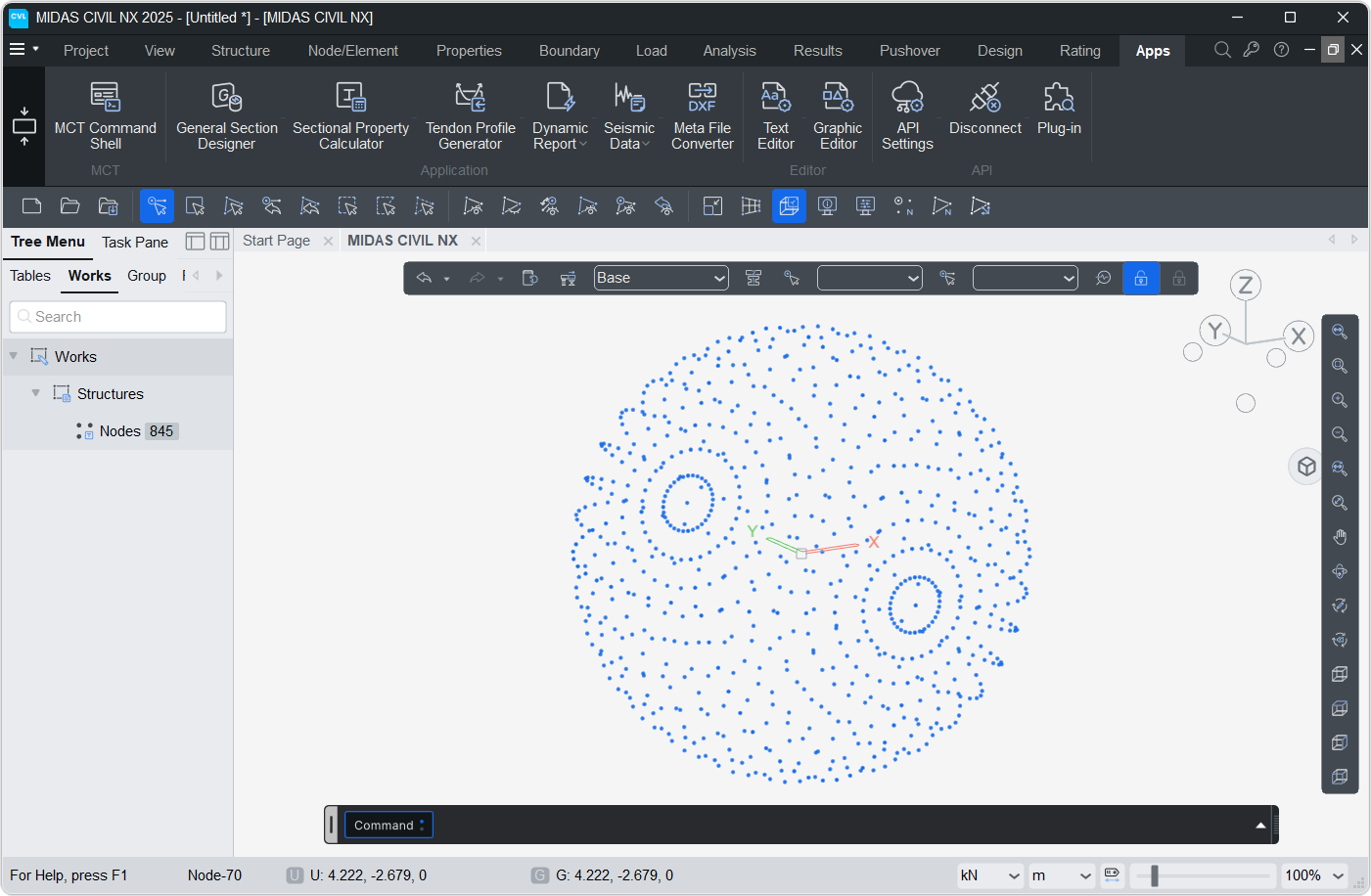
import math
n=50
R=5
phi=0
for j in range(40):
    for i in range(n):
        theta = i*2*math.pi/n
        Node(R*math.sin(theta)*math.cos(phi),R*math.cos(theta),R*math.sin(theta)*math.sin(phi))

    phi+=math.pi/16

Node.create()
3. Rotating Nodes
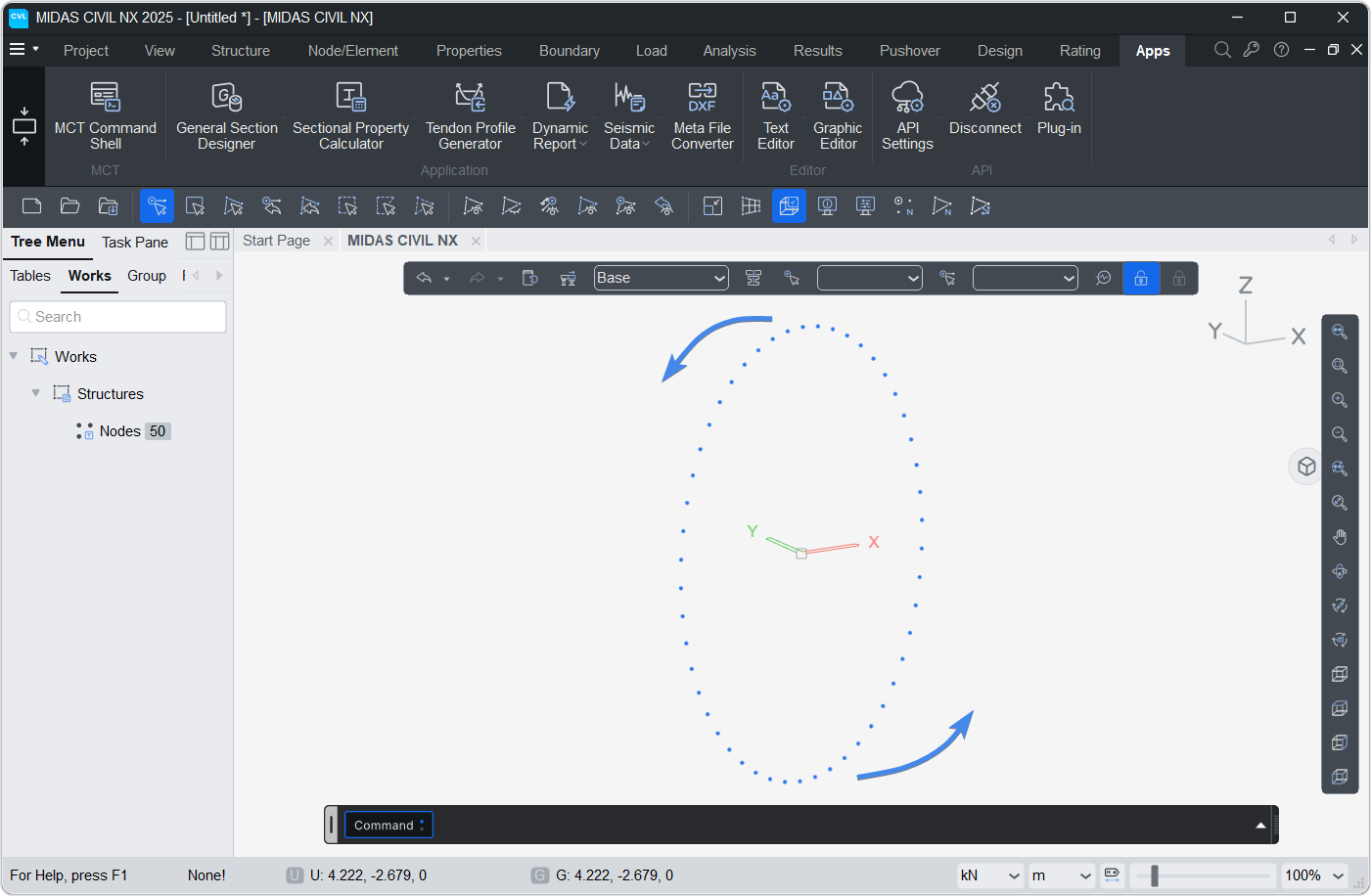
import math
n=50
R=5
phi=0
for j in range(40):
    for i in range(n):
        theta = i*2*math.pi/n
        Node(R*math.sin(theta)*math.cos(phi),R*math.cos(theta),R*math.sin(theta)*math.sin(phi),i+1)

    phi+=math.pi/16
    Node.create()

Node Local Axis
In MIDAS CIVIL NX, nodes can have a local axis orientation different from the global axis. This is used to apply boundary conditions or interpret results in a skewed (rotated) coordinate system.
NodeLocalAxis(nodeID: int, type: Literal['X','Y','Z','XYZ','Vector'], angle)
Two definition methods are supported:
- Angle (
type='X','Y','Z', or'XYZ'): Rotations about one or more global axes in degrees. Corresponds to APIiMETHOD = 1. - Vector (
type='Vector'): Explicit definition of the local X and Y axes as unit vectors. Corresponds to APIiMETHOD = 3.
Parameters
nodeID: ID of the node to assign the local axis to.type: Method used to define the local axis.'X'- Rotation angle (degrees) about the global X-axis.'Y'- Rotation angle (degrees) about the global Y-axis.'Z'- Rotation angle (degrees) about the global Z-axis.'XYZ'- Three rotation angles[rx, ry, rz](degrees) about global X, Y and Z.'Vector'- Two direction vectors[[v1x,v1y,v1z],[v2x,v2y,v2z]]defining the local X and Y axes explicitly.
angle: Value matching the chosentype.'X','Y','Z': a single angle in degrees. e.g.30'XYZ': list of three angles. e.g.[0, 0, 45]'Vector': list of two vectors. e.g.[[1,0,0],[0,0,1]]
Note
If a local axis is defined again for a node that already has one, the existing definition is updated.
When type is 'X', 'Y' or 'Z', the angles of the other two axes are preserved from the existing definition.
Object Attributes
ID: Node ID to which the local axis is assigned.
TYPE: Definition method. 'ANGLE' for 'X', 'Y', 'Z', 'XYZ' and 'VEC' for 'Vector'.
ANGLE: Rotation angles [rx, ry, rz] in degrees. Used when TYPE = 'ANGLE'.
VEC: Local X and Y axis vectors [[v1x,v1y,v1z],[v2x,v2y,v2z]]. Used when TYPE = 'VEC'.
Class Attributes
NodeLocalAxis.skew -> List of all node local axis objects.
NodeLocalAxis.ids -> List of node IDs having a local axis.
NodeLocalAxis(10, 'Z', 30)
NodeLocalAxis(20, 'Vector', [[1,0,0],[0,0,1]])

for ax in NodeLocalAxis.skew:
    print(f' NODE ID = {ax.ID} | TYPE = {ax.TYPE}')

# Output :
# NODE ID = 10 | TYPE = ANGLE
# NODE ID = 20 | TYPE = VEC
Methods
NodeLocalAxis.json
Returns a JSON representation of all node local axes defined in python.
Angle based definitions use iMETHOD = 1 and vector based definitions use iMETHOD = 3.
NodeLocalAxis(10, 'Z', 30)
NodeLocalAxis(20, 'Vector', [[1,0,0],[0,0,1]])

print(NodeLocalAxis.json())

# Output :
# {'Assign': {10: {'iMETHOD': 1, 'ANGLE_X': 0, 'ANGLE_Y': 0, 'ANGLE_Z': 30},
#             20: {'iMETHOD': 3, 'V1X': 1, 'V1Y': 0, 'V1Z': 0, 'V2X': 0, 'V2Y': 0, 'V2Z': 1}}}
NodeLocalAxis.create
Sends the current node local axis list to the Civil NX using a PUT request.
New local axes are created and existing ones (same node) in Civil NX will be updated.
NodeLocalAxis(10, 'Z', 30)
NodeLocalAxis(20, 'Vector', [[1,0,0],[0,0,1]])

NodeLocalAxis.create()
NodeLocalAxis.get
Fetches node local axis data from the Civil NX and returns the JSON representation.
print(NodeLocalAxis.get())
NodeLocalAxis.sync
Retrieves node local axis data from the Civil NX and rebuilds the internal list.
Angle based (iMETHOD = 1) axes are imported as 'XYZ' and vector based (iMETHOD = 3) axes are imported as 'Vector'.
A warning is printed for nodes whose local axis type is not supported.
NodeLocalAxis.sync()
for ax in NodeLocalAxis.skew:
    print(f' NODE ID = {ax.ID} | TYPE = {ax.TYPE}')
NodeLocalAxis.clear
Deletes all node local axis data from Python.
NodeLocalAxis.clear()
NodeLocalAxis.delete
Deletes all node local axis data from both Python and Civil NX.
NodeLocalAxis.delete()
Examples
1. Rotation about a single axis
Node(0,0,0,1)
Node(5,0,0,2)

NodeLocalAxis(2, 'Z', 30)      # Rotate local axis of node 2 by 30° about global Z

Node.create()
NodeLocalAxis.create()
2. Combining rotations
Defining a single-axis rotation again for the same node keeps the previous angles of the other axes.
NodeLocalAxis(10, 'Z', 30)
NodeLocalAxis(10, 'X', 15)     # Node 10 now has X = 15° , Y = 0° , Z = 30°

print(NodeLocalAxis.json())

# Output :
# {'Assign': {10: {'iMETHOD': 1, 'ANGLE_X': 15, 'ANGLE_Y': 0, 'ANGLE_Z': 30}}}
3. Three angles at once
NodeLocalAxis(20, 'XYZ', [0, 45, 0])    # Rotate 45° about global Y

NodeLocalAxis.create()
4. Using vectors
Define the local X and Y axes directly. The local Z axis follows from these two.
NodeLocalAxis(30, 'Vector', [[1,0,0],[0,0,1]])    # Local X = global X , Local Y = global Z

NodeLocalAxis.create()
5. Skewed support at multiple nodes
import math

for i, nID in enumerate([1, 2, 3, 4]):
    NodeLocalAxis(nID, 'Z', i*15)      # Progressive rotation of 0°, 15°, 30°, 45°

NodeLocalAxis.create()