Model
This manual provides detailed documentation of the Model class methods used for managing structural analysis models via Midas API.
Model.new
Creates a new model file.
Model.new()
Model.open
Opens an existing model file.
Model.open("D:\\model.mcb")
Model.close
Closes an opened model file.
Model.close()
Model.save
Saves the current model. For first-time saves, provide a path.
NOTE
If path is not provided for the first time GUI prompt will appear
Model.save()
Model.save("D:\\model.mcb")
Model.saveAs
Saves the model to the specified file path.
Model.saveAs("D:\\model.mcb")
Model.saveStageAs
Save Construction Stage as separate model
Model.saveStageAs("CS0","D:\\Stage_CS0.mcb")
Model.importMCT
Imports MCT data file in MIDAS CIVIL NX.
Model.importMCT('D:\\model.mct')
Model.importJSON
Imports JSON data file in MIDAS CIVIL NX.
Model.importJSON('D:\\model.json')
Model.exportMCT
Exports MIDAS CIVIL NX model as MCT file.
Model.exportMCT('D:\\model.mct')
Model.exportJSON
Exports MIDAS CIVIL NX model as JSON file.
Model.exportJSON('D:\\model.json')
Model.info
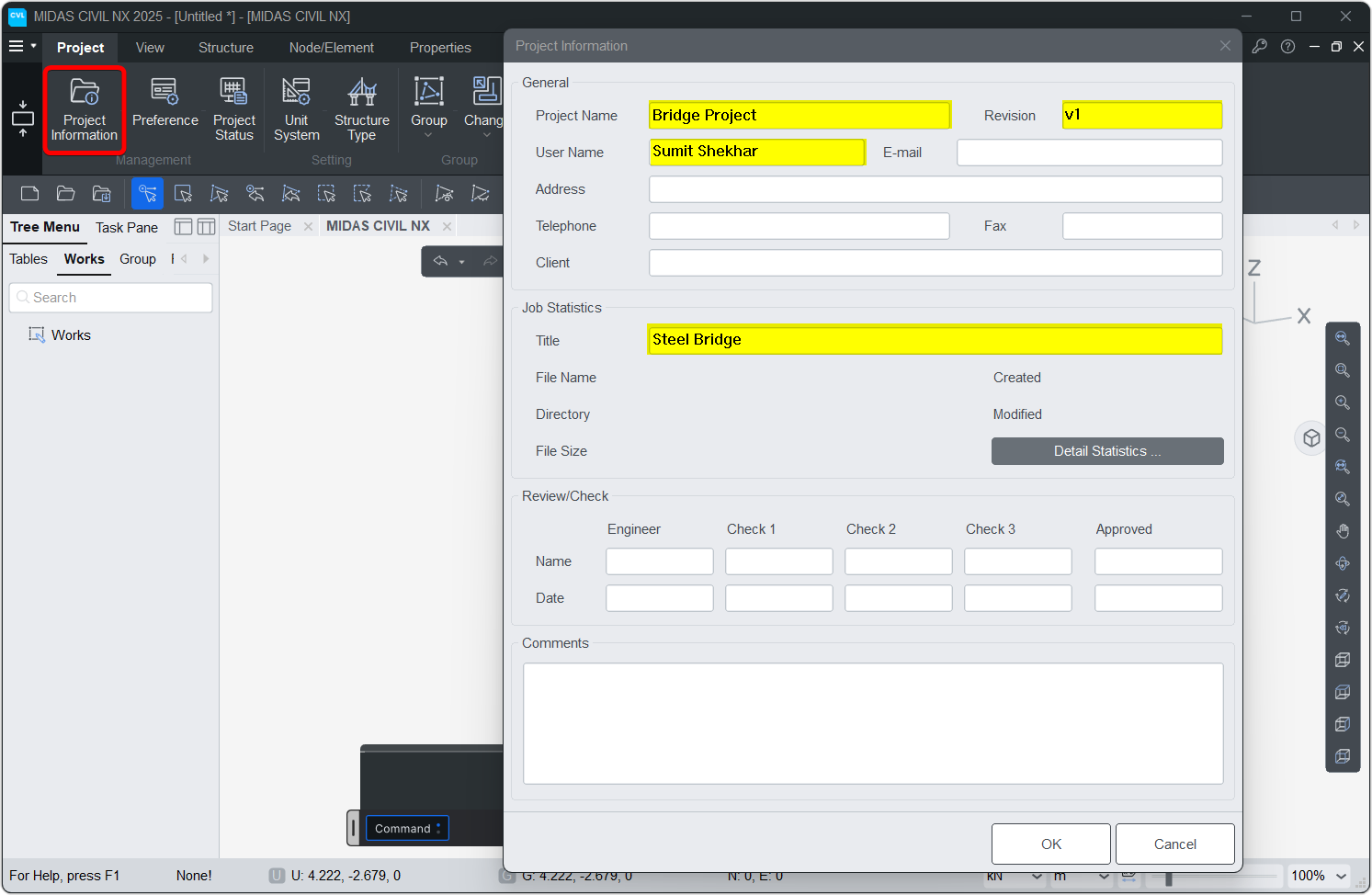
Sets the project information.
info(project_name="", revision="", user="", title="",comment="")
Model.info(project_name="Bridge Project", revision="v1", user="Sumit Shekhar", title="Steel Bridge")
Model.units
Sets the model's working units.
Model.units(force="KN", length="M", heat="BTU", temp="C")
Parameters
force: KN, N, KGF, TONF, LBF, KIPSlength: M, CM, MM, FT, INheat: CAL, KCAL, J, KJ, BTUtemp: C, F
Model.units() # Set the SI unit system
Model.units(force='TONF') # Set the Force unit to Tonf
NOTE :
Make sure the units are in all caps
Model.getUnits
Get the model's working units. Can be used with Model.units().
Model.getUnits()
# Get the current model units
old_unit = Model.getUnits()

# Set the model force unit to N
Model.units(force='N')
# ANY OPERATION ON MODEL


# Reverting the units to old unit
Model.units(old_unit)
Model.syncUnits
Sync the python model units with CIVIL NX model's working units.
Model.syncUnits()
Model.syncUnits()
print(NX.units)
# Output :
# {'FORCE': 'KN', 'DIST': 'M', 'HEAT': 'BTU', 'TEMPER': 'F'}
Model.type
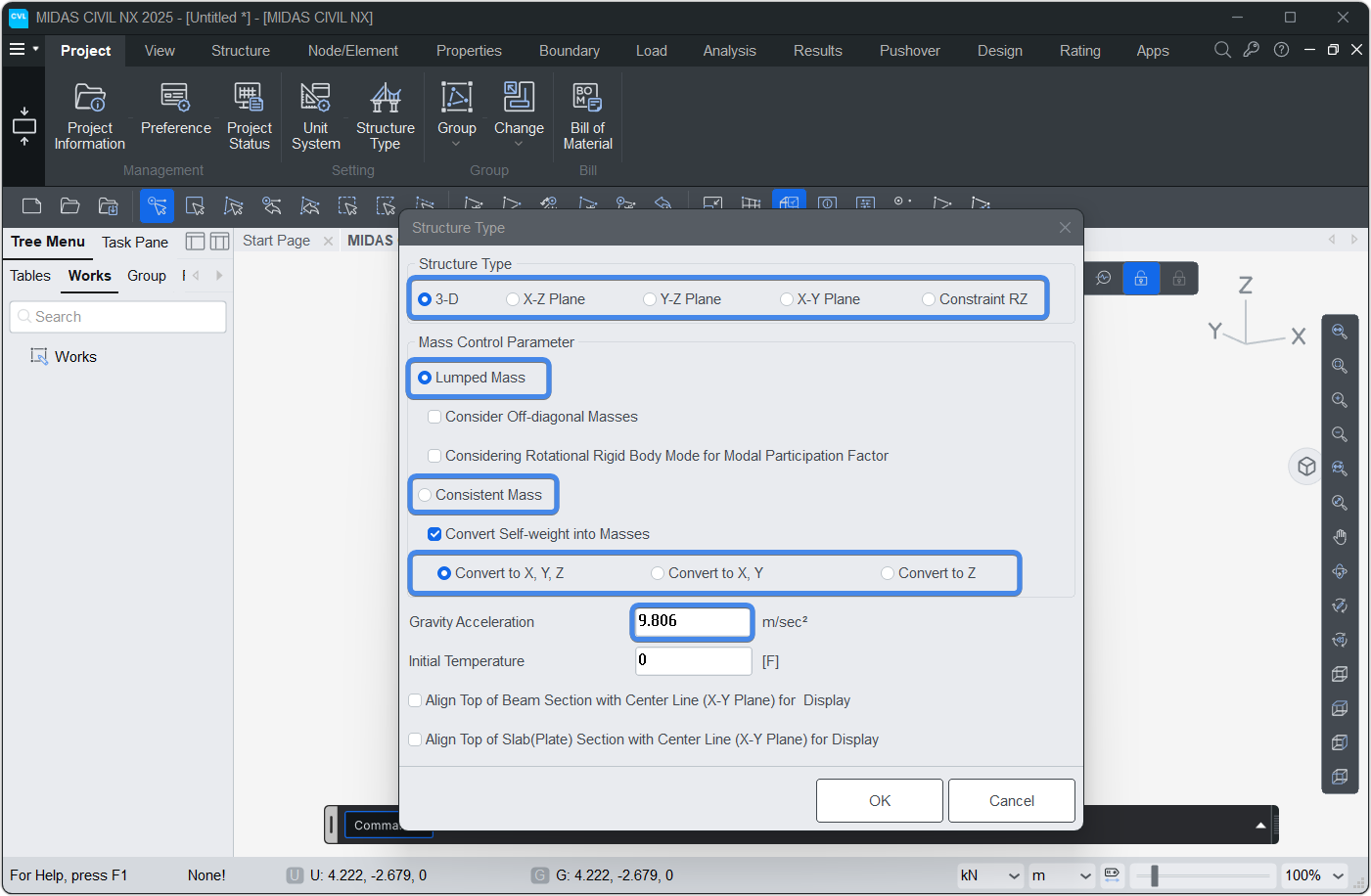
Sets structure and mass type information for the model.
Model.type(strc_type=0, mass_type=1, gravity=0, mass_dir=1)
Parameters
strc_type: 0 : 3D | 1 : X-Z | 2 : Y-Z | 3 : X-Y | 4 : RZ constraintmass_type: 1 : Lumped | 2 : Consistentgravity: Gravity acceleration (l/t²)mass_dir: 1 : Convert to XYZ | 2 : Convert to XY | 3 : Convert to Z only
Model.type()
Model.create
Creates all model components: materials, sections, nodes, elements, groups, and boundaries.
Equivalent to executing all the create commands individually
Model.create()
Model.clear
Clears all internal python data of the model, including nodes, elements, materials, groups, loads, and boundaries.
Equivalent to executing all the clear commands individually
It does not delete data from CIVIL NXModel.clear()
Model.analyse
Checks whether a model has been analyzed. If not, saves it and then analysis.
Model.analyse()
Model.maxID
Retrieves the maximum ID currently assigned to a specific database item (such as nodes, elements, materials, etc.). If no data exists for the specified database, it returns 0.
Model.maxID(dbNAME='NODE', fast=False)
Parameters
-
dbNAME: The name of the database to query. Default is'NODE'. Expected values:
'NODE': Nodes |'ELEM': Elements |'MATL': Materials |'SECT': Sections |'THIK': Thicknesses |'ELNK': Elastic Links |'RIGD': Rigid Links -
fast: A boolean flag (TrueorFalse). If set toTrue, it fetches the maximum ID quickly by querying the project status data rather than loading the entire database. Default isFalse.
Returns
int: The highest ID present in the specified database.
Examples
Model.maxID()
Model.Select
Selects nodes and elements based on geometric criteria or material/section properties and returns output.
-
output: Output of the Select command.NODE_ID→ Return selected Node IDs
NODE→ Return selected Node Objects
ELEM_ID→ Return selected Element IDs
ELEM→ Return selected Element Objects
Model.Select commands returns a Set of selected items.
All the python operations related to Set type can be utilised to modify selection.
Set Operators: Geeks for Geeks reference
# & Set Operator to select only the truss elements on XZ plane
IDs_truss_on_XZ = Model.Select.Plane_XZ((0,0,0) ,'ELEM_ID') & Model.Select.Element('TRUSS')
Model.Select.Line
Model.Select.Line(point1:tuple = (0,0,0) , point2:tuple=(1,0,0) , output:_SelectOutput='NODE_ID' , radius:float=0.001)
Selects nodes / elements that lies on the line connecting two given points.
The output is sorted based on the distance from start point (point1)
Parameters
point: Start location [x, y, z]point2: End location [x, y, z]output: Output of the Select command.radius: Selection radius around the line
Model.Select.Line_alongX
Model.Select.Line_alongX(point:tuple = (0,0,0), output:_SelectOutput='NODE_ID',radius:float=0.001)
Selects nodes / elements that lies on the line parallel to X axis passing through given point.
The output is sorted based on the ascending X location.
Parameters
point: Point location [x, y, z]output: Output of the Select command.radius: Selection radius around the line
Model.Select.Line_alongY
Model.Select.Line_alongY(point:tuple = (0,0,0), output:_SelectOutput='NODE_ID',radius:float=0.001)
Selects nodes / elements that lies on the line parallel to Y axis passing through given point.
The output is sorted based on the ascending Y location.
Parameters
point: Point location [x, y, z]output: Output of the Select command.radius: Selection radius around the line
Model.Select.Line_alongZ
Model.Select.Line_alongZ(point:tuple = (0,0,0), output:_SelectOutput='NODE_ID',radius:float=0.001)
Selects nodes / elements that lies on the line parallel to Z axis passing through given point.
The output is sorted based on the ascending Z location.
Parameters
point: Point location [x, y, z]output: Output of the Select command.radius: Selection radius around the line
Model.Select.Box
Model.Select.Box(point1:tuple = (0,0,0) , point2:tuple=(1,1,1) , output:_SelectOutput='NODE_ID')
Selects nodes / elements that lies within the box. For elements, the selection is based on whether its mid-point lies inside the box or not.
Parameters
point1: First Corner of the box selection [x, y, z]point2: Diagonally opposite Corner of the box selection [x, y, z]output: Output of the Select command.
Model.Select.Plane_XY
Model.Select.Plane_XY(point:tuple = (0,0,0) , output:_SelectOutput='NODE_ID')
Selects nodes / elements that lies on XY plane passing through given point. For elements, the selection is based on whether its mid-point lies on the plane or not.
Parameters
point: First Corner of the box selection [x, y, z]output: Output of the Select command.
Model.Select.Plane_YZ
Model.Select.Plane_YZ(point:tuple = (0,0,0) , output:_SelectOutput='NODE_ID')
Selects nodes / elements that lies on YZ plane passing through given point. For elements, the selection is based on whether its mid-point lies on the plane or not.
Parameters
point: First Corner of the box selection [x, y, z]output: Output of the Select command.
Model.Select.Plane_XZ
Model.Select.Plane_XZ(point:tuple = (0,0,0) , output:_SelectOutput='NODE_ID')
Selects nodes / elements that lies on XZ plane passing through given point. For elements, the selection is based on whether its mid-point lies on the plane or not.
Parameters
point: First Corner of the box selection [x, y, z]output: Output of the Select command.
Model.Select.Element
Model.Select.Element(type=None,matID=None,secID=None,output:_SelectOutputElem='ELEM_ID')
Selects elements based on type, material and section properties
Parameters
type:strorlist[str]of element types. Eg.type='TRUSS'ortype=['TRUSS','BEAM']matID:intorlist[int]of Material IDs. Eg.matID=1ormatID=[1,2,3]secID:intorlist[int]of Section IDs. Eg.secID=1orsecID=[1,2,3]output: Output of the Select command.ELEM_IDorELEM
Model.Select.Polygon
Model.Select.Element(points:list,output:_SelectOutput='NODE_ID')
Selects nodes / elements that lies inside or on the edge of the polygon defined by the input points.
For elements, the selection is based on whether its mid-point lies inside the polygon or not.
Parameters
points:list[(x,y,z)]List of points that forms the selection polygon. Eg.[(0,0,0),(1,0,0),(0,0,1)]output: Output of the Select command.
Model.getSelected
Retrieves the IDs of nodes or elements that are currently selected.
Model.getSelected(item="ELEM_ID")
Parameters
item: Specifies the type of selected items to retrieve. Expected values:
'ELEM_ID': Returns a list of selected Element IDs (Default) |'NODE_ID': Returns a list of selected Node IDs
Returns
list: A list containing the IDs (int) of the selected nodes or elements. Returns an empty list[]if no items are currently selected.
Examples
Model.getSelected()
Model.IMAGE
Capture the image in the viewport
Model.IMAGE(location='', image_size = View.Image_Size , view='pre',CS_StageName:str='' , _boutputImage=True)
The IMAGE function captures the image of the current viewport.
It allows you to control image size, output location, and optional construction stage settings.
Examples can be found in View Section
Parameters
-
location(str): Optional. File path where the image will be saved -
image_size(tuple): (Width , Height) of the output image in pixels. -
CS_StageName(str): Optional. Construction stage name -
_bOutputImage(bool): Optional. Whether to returnImageobject or JSON.
Returns
- Pillow
Imageobject or - JSON dictionary
Model.IMAGE("E://API//temp//ModelImage.jpg")
Model.snap
Captures a snapshot of the current geometry.
The snapshot can be viewed by Model.visualise() or attached to external application as plotly chart via Model.goFigure().
Model.snap()
Model.snap()
Model.visualise
Display plotly figure representing the model geometry in browser.
Model.visualise(id=None, bGrid=True, bNode=True, bNodeID=False, bElementID=False, bSupport=True, bPointSpring=True, bElink=True, bRigidLink=True)
Parameters
-
id(int): ID of the snapshot. If None is provided, a snapshot will be taken at the point of Model.visualise(). -
bGrid(bool): Whether to display Grid or not. -
bNode(bool): Whether to display Node(as circle) or not. -
bNodeID(bool): Whether to display Node ID or not. -
bElementID(bool): Whether to display Element ID or not. -
bSupport(bool): Whether to display Supprt (diamond shape) or not. -
bPointSpring(bool): Whether to display Point Spring (circle) or not. -
bElink(bool): Whether to display Elastic Link (dashed line) or not. -
bRigidLink(bool): Whether to display Rigid Link (dashed line) or not.
Model.visualise()
Model.goFigure
Returns a plotly go figure of the captured snapshot (captured via Model.snap()).
This go figure can be attached to webapps to display the model in webbrowser.
Model.goFigure(id=None, bGrid=True, bNode=True, bNodeID=False, bElementID=False, bSupport=True, bPointSpring=True, bElink=True, bRigidLink=True)
Parameters
-
id(int): ID of the snapshot. -
bGrid(bool): Whether to display Grid or not. -
bNode(bool): Whether to display Node(as circle) or not. -
bNodeID(bool): Whether to display Node ID or not. -
bElementID(bool): Whether to display Element ID or not. -
bSupport(bool): Whether to display Supprt (diamond shape) or not. -
bPointSpring(bool): Whether to display Point Spring (circle) or not. -
bElink(bool): Whether to display Elastic Link (dashed line) or not. -
bRigidLink(bool): Whether to display Rigid Link (dashed line) or not.
Returns
- Plotly GO figure
Model.goFigure()